Attaché
A personal assistant you install with one command. It runs on your own machine, keeps your to-dos and reminders, makes interactive pages on demand, and learns how you work through a folder of skills it can edit itself. The core is under 2,860 lines of Python, a cap that CI enforces. Everything else is a skill.
uvx attache                  # try it without installing
uv tool install attache      # keep it
attache init && attache run  # set up ~/.attache, then start the web page
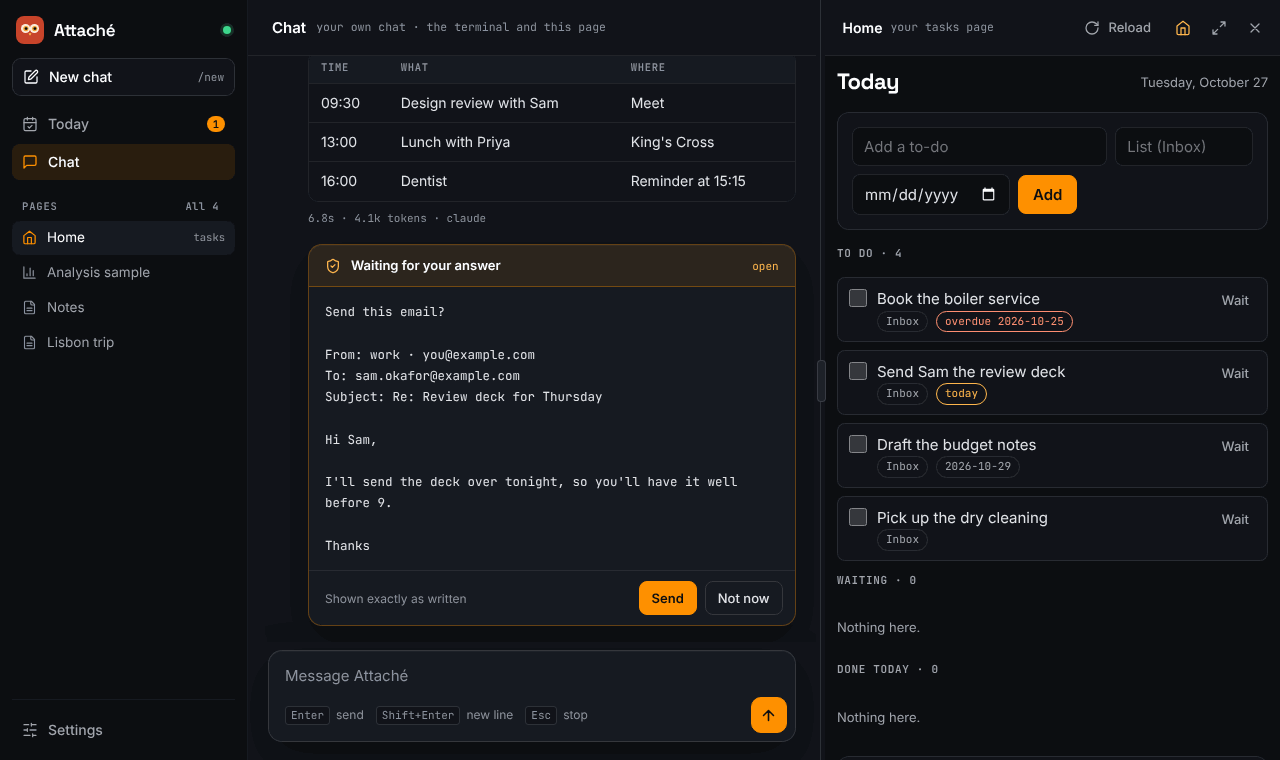
You chat with Attaché in a terminal and on a local web page, and both are the same conversation. Ask it for a to-do, a reminder or a board, and the Home page updates while you watch. Tell it how you like things done and it writes that into a skill, which you can read, change, and undo with one command.
Phase 1
This release is the local core: terminal and web chat, to-dos, reminders, pages and skills. Slack and Signal arrive in phase 2, and email (Outlook, Gmail, Titan) in phase 3. See Design and roadmap.
Where to start
-
Quickstart
Install Attaché, set up your home folder, open the web page and have a first chat.
-
Configuration
Pick the models for your own chats and for group chats: Claude Code, the Claude API, OpenAI, or a local model through Ollama.
-
Skills
The folder of know-how that Attaché reads and rewrites, with a git history you can browse and undo.
-
Pages
Interactive HTML pages over your real data, kept live by a small bridge, and sandboxed in the Attaché window.
-
Security
Who can do what, how pages are sandboxed, and what the Claude Code backend may do on your behalf.
-
Design and roadmap
The full design proposal, the research behind it, and the four phases.
Want to help? Bug fixes and simplifications go in the core, and features go in skills. See Contributing.